
Air Cluster Pro – 1 Year
$3.50
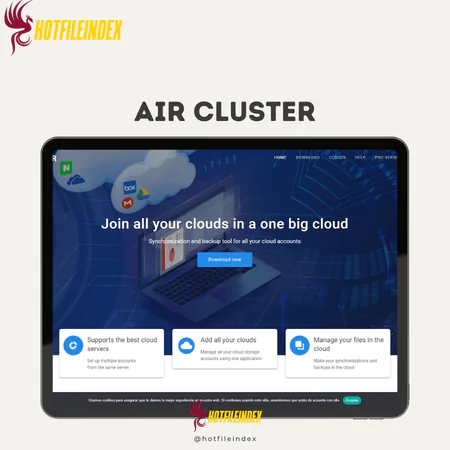
Air Cluster is a tool that lets you connect and manage multiple cloud storage accounts in one place, allowing you to sync, back up, and combine storage
You will get Shared Account of
- FE
Files are scattered everywhere. Documents sit in Google Drive. Backups rest in Dropbox. Old archives linger in OneDrive. Before you know it, moving a single folder means jumping from one platform to another.
What if you could control every cloud account from one clean dashboard instead of juggling them separately?
That is exactly where Air Cluster Pro comes in.
What is Air Cluster Pro?

Air Cluster is an application that merges multiple cloud storage accounts into one unified system. Instead of handling each service individually, you can sync, back up, and organize your files from a single centralized platform.
It supports major providers such as Google Drive, OneDrive, Dropbox, Mega, Box, pCloud, SharePoint, and many others, along with SFTP and WebDAV. You can even add multiple accounts from the same provider and combine their storage into one large virtual cloud for easier management.
Key Features

- Unified Cloud Management: Combine all your cloud storage accounts into one virtual cloud and manage everything from a single interface.
- Multi-Cloud Support: Works with a wide range of services including Google Drive, OneDrive, Dropbox, Mega, Box, pCloud, SharePoint, Naver, Yandex, and more, plus SFTP and WebDAV protocols.
- Multiple Accounts per Service: Add several accounts from the same provider and integrate them into one unified system.
- File Synchronization: Sync folders across different cloud platforms and your device using the total capacity of all connected accounts.
- Cloud Backup: Back up data from one or multiple cloud accounts into your unified cluster for better organization and security.
- Centralized Search: Search for files across all connected clouds from one interface, saving time and effort.
- Optional Encryption: Secure uploads and transfers with optional encryption for added privacy.
- Enhanced Storage Capacity: Expand your total cloud storage by combining free and paid accounts from multiple providers.
- Intuitive File Management: Organize, manage, and transfer files easily within the unified cloud through a user-friendly interface.
Pricing Plans

| Plan | Price | Clusters | Accounts per Cluster | Encryption | Sync Function | Speed Limiter | Simultaneous Downloads |
| Basic | Free | 2 clusters | 3 | No | Basic | No | 5 |
| Pro Lifetime | $36 (one-time) | Unlimited | Unlimited | Yes | Save & load sync | Yes | Unlimited |
| Pro 2 Years | $25 | Unlimited | Unlimited | Yes | Save & load sync | Yes | Unlimited |
| Pro 1 Year | $17 | Unlimited | Unlimited | Yes | Save & load sync | Yes | Unlimited |
Advantages
- Scalable Storage Expansion via Cloud Pooling: Merge multiple free and premium cloud accounts into one larger storage space, increasing total capacity without being limited to a single provider.
- Enterprise-Level Multi-Cloud Sync: Synchronize files between your computer and multiple cloud platforms simultaneously, or transfer data directly between different services.
- Enhanced Client-Side Encryption: Encrypt files on your device before uploading to ensure data is protected from the start.
- Centralized Cross-Cloud Search: Quickly locate files across multiple connected cloud accounts without logging into each service separately.
- Streamlined Multi-Account Control: Manage multiple accounts from the same provider, such as several Google Drive accounts, within one organized dashboard.
Disadvantages
- Dependent on Internet Connectivity: Performance relies on a stable internet connection, and slow networks may impact syncing or access speed.
- Complexity for New Users: Managing multiple accounts and advanced sync settings may feel overwhelming for beginners.
- Potential Security Risks if Misconfigured: Incorrect setup or weak credentials could expose data across services.
- Performance Variability Between Providers: Sync speed and reliability can vary depending on the cloud provider.
Who Should Use Air Cluster?
- Remote Workers & Digital Nomads: Ideal for professionals managing files across multiple cloud platforms while working on different devices.
- Content Creators & Media Professionals: Useful for handling large files across services and transferring assets without manual downloads.
- Small Business Owners & Teams: Helps centralize file management, backups, and syncing across different departments or accounts.
- Students & Researchers: Makes it easier to organize, search, and sync academic files stored across various cloud services.
- Users with Limited Local Storage: Perfect for those who need to expand usable storage by combining multiple cloud accounts.
FAQs About Air Cluster
- Does Air Cluster increase cloud storage space?
Yes. By combining multiple free or paid accounts, it effectively expands your total available cloud storage. - Is Air Cluster safe to use?
It supports client-side encryption, meaning files can be encrypted before upload. Your data remains stored within your connected cloud providers. - Can Air Cluster sync between different cloud services?
Yes. It allows synchronization between local devices and multiple cloud platforms, as well as transfers between different providers. - Which cloud services does Air Cluster support?
It supports major providers such as Google Drive, OneDrive, Dropbox, Mega, Box, pCloud, SharePoint, Nextcloud, and more, including SFTP and WebDAV connections. - Does Air Cluster work with multiple accounts from the same provider?
Yes. You can add multiple accounts from the same service and manage them together in one interface.
Conclusion
Air Cluster transforms scattered cloud accounts into one powerful, unified storage system. Everything works together smoothly within a single platform, giving you better control, flexibility, and efficiency.
| Time | 1 Year |
|---|
All Info just pre-build when listing. Until Product mark as "Instant Deliver", infomation will be updated again like OTOs you will be get,..etc
Related products

Softwares

Softwares
Content & Articles Tools

Book & Course builders

Cloud & hosting

Softwares

Content & Articles Tools

Softwares

SAAS