
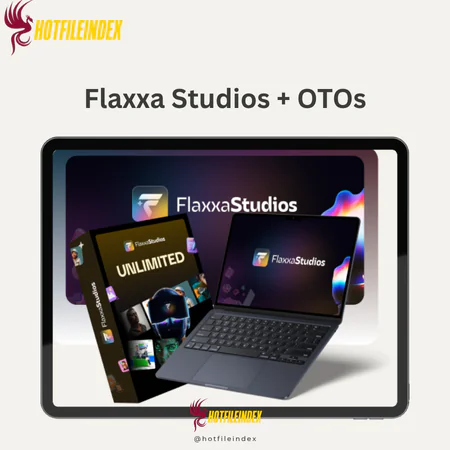
Flaxxa Studios + OTOs
Original price was: $97.00.$16.00Current price is: $16.00.
Flaxxa Studios is an AI design platform that lets you generate, edit, and customize professional visuals from text prompts for social media, print, branding, and product use.
You will get Individual Account of
- FE + OTO1
If you’ve ever tried making money online, you know how vital visuals are — from ads and product photos to social media content. But producing studio-quality graphics often requires hours of effort, expensive freelancers, or complex design software.
For many creators and business owners, this becomes a major hurdle, keeping them focused on design work instead of scaling their business.
That’s why Hotfileindex introduces Flaxxa Studios, a platform built to simplify professional visual creation — making it faster, easier, and more cost-effective.
What is Flaxxa Studios?

Flaxxa Studios is an AI-powered design platform that helps users create professional-quality visuals quickly and efficiently. You can generate images from text prompts, edit and refine them, maintain consistent styles or characters, and export for web or print use.
It also provides ready-to-use workflows for social media graphics, Amazon product images, print-on-demand designs, brand kits, and even full storybooks.
Key Features

- Perfect Text Engine: Generate crisp, professional-looking text without the blurry or broken edges often found in other AI tools. When tested on a product label, the text appeared clear and print-ready without any manual correction.
- AI Image Designer Pro: Type your concept, and the AI instantly produces visuals, artwork, photos, or logos based on your description. When I tested it with a futuristic gadget idea, the results matched my vision perfectly.
- Character Vault: Create and store characters or mascots that remain consistent across all your designs. I developed a brand mascot that appeared identical across my product images and social content.
- Background Remover/Changer: Easily delete or swap backgrounds while the AI automatically adjusts lighting and shadows for realism. I replaced a cluttered background on a product image, and it looked naturally composed.
- Batch Processing Studio: Upload multiple products and generate hundreds of visuals simultaneously. This tool saved hours of manual work when designing Amazon listings.
- Social Media Designer: Produce ready-to-post visuals optimized for platforms like Instagram and Facebook. Every post fits perfectly without worrying about dimensions.
- E-commerce Product Shots: Generate studio-quality images for platforms like Amazon, Etsy, or Shopify with one click. I used it to produce product photos for my store without hiring a photographer.
- Print-on-Demand Designer: Instantly turn basic designs into mockups for T-shirts, mugs, and posters. My test project produced ready-to-sell visuals in just minutes.
- Logo Creator: Create multiple logo options in seconds, each tailored to your brand’s style. It delivered creative logo ideas without the need for Illustrator.
- Storybook Studio: Convert written stories into illustrated books with consistent characters and ready-to-publish layouts. My children’s story draft came out looking professionally illustrated.
- AI Upscaler: Improve low-resolution or blurry images to high-definition quality suitable for printing. A stock image I enhanced came out detailed and clear.
- Canvas Editor: Modify layers, colors, and elements directly within Flaxxa Studios with no Photoshop required. Editing complex visuals became simple and efficient.
- Virtual Influencers: Generate realistic AI models to promote your brand or products, eliminating the need for costly photo sessions. The AI-created model looked authentic enough for ad campaigns.
- Smart Resize & Export: Instantly adapt one design for various platforms like YouTube, Facebook, or LinkedIn. I resized a banner for multiple channels in seconds.
- Seamless Pattern Creator: Design repeating patterns for textiles, wallpapers, or digital backgrounds. The patterns I made aligned perfectly for my print-on-demand store.
- Brand Kit Manager: Save and reuse your brand’s colors, fonts, and logos to maintain consistent branding automatically. Every design remained visually aligned with my identity.
- Inpainting & Object Replace: Remove or substitute objects naturally within images. I erased unwanted items from a product shot, and the edits blended flawlessly.
- YouTube Thumbnail Wizard: Create high-impact thumbnails with A/B testing options. I tested several versions, and engagement noticeably improved.
- Mockup Maker: Visualize designs on real-life products for clients or eCommerce previews. The mockups I created looked polished and professional, ideal for showcasing final designs.
Pricing plans
OTO 1 (Unlimited): $67–$97
First upsell: Unlocks full usability of the tool
Base version: Limited number of projects
Unlimited version: Create unlimited content without quotas
Unlimited projects
Faster rendering
No caps or restrictions
Requires extra payment upfront, feels pushy
OTO 2 (DFY): $97–$147
Done-for-you package saves time
Includes pre-built campaigns, video intros/outros, and ad creatives
Able to launch a campaign in under 30 minutes using a template
Pros: major time-saver, professional quality
Cons: templates are shared, so customization is needed to stand out
OTO 3 (Automation): $67–$97
Added scheduling, auto-posting, and bulk rendering
Enabled batching a week’s content and posting automatically
Pros: automation = more free time
Cons: setup requires some learning
OTO 4 (DFY Funnels): $97–$197
Provided full funnels: opt-in pages, lead magnets, email follow-ups
Launched a funnel and collected 210+ leads in a week
Pros: plug-and-play funnels that convert
Cons: limited niches and generic branding unless customized
OTO 5 (Traffic): $97–$197
Connects to ad platforms and social channels, uses AI to optimize campaigns
Tested with a $100 ad budget; targeting improved
Pros: smarter targeting, better ad performance
Cons: still requires ad spend, results aren’t immediate
However, if you’re still considering the official pricing or want to experience Flaxxa Studios lifetime access at a much more affordable rate, Hotfileindex is your best choice. At Hotfileindex, you can get it for only $16 — a true bargain compared to the original cost.
Why Should You Buy Flaxxa Studios from Hotfileindex?
If you’re looking for exceptional value, trusted digital products, and a smooth purchasing experience, Hotfileindex is the ideal platform. Here’s why buying through us is a smart decision:
- Top-Quality Assurance: Every account is fully tested, verified, and 100% functional before delivery. We only provide premium, dependable services.
- Unbeatable Pricing: Get Flaxxa Studios for just $16 — one of the lowest prices available, with no extra or hidden fees.
- Convenient Payment Options: Easily pay via MOMO or Online Banking for a fast and secure checkout experience.
- 7-Day Refund Policy: If you’re not fully satisfied, contact us within 7 days for a complete refund—no complications or questions asked.
- 24/7 Customer Support: Our support team is available around the clock to resolve any inquiries or issues promptly.
How to Buy and Use Flaxxa Studios
Step 1 – Choose Your Product:
Browse through the available plans and add your desired option to your shopping cart.
Step 2 – Confirm Order Details:
Review your selections to ensure everything is correct before proceeding.
Step 3 – Select a Payment Method:
Choose MOMO or Online Banking at checkout. Be sure to enter the correct email address to receive your login credentials.
Step 4 – Complete the Purchase:
Once payment is confirmed, you’ll receive your account information by email. Follow the provided instructions to activate and start using Flaxxa Studios immediately.
- How to use
Flaxxa Studios features an intuitive interface. After logging in, all tools are displayed in a left-side menu for easy navigation.
- Art Creator: Generate stunning artwork from a simple prompt and adjust color, style, and details to create unique, handcrafted visuals.
- Social Post Designer: Design shareable posts quickly by tweaking visuals, tone, and style for better engagement.
- Prompt to Image: Convert text descriptions into realistic, high-quality images within seconds.
- Animal Portraits: Create personalized pet or animal portraits with customizable backgrounds, outfits, and artistic styles.
Overall, the platform offers a fast, streamlined workflow that produces professional-quality visuals with minimal effort.
Advantages
- Perfect-Text Engine: Ensures crisp, clear text on all designs, ideal for ads, logos, and social posts.
- Brand Management Tools: Maintain brand consistency using Character Vault, Brand Kits, and Style Locker.
- Batch Processing: Upload CSV files to create multiple designs simultaneously, ideal for agencies and e-commerce stores.
- E-commerce Tools: Generate Amazon product shots, print-on-demand designs, and marketing visuals without a photographer.
- Advanced Editor: Layer-based editor with masks, guides, and adjustments for detailed editing.
- High-Quality Exports: Web-optimized and CMYK-ready outputs for print projects.
- Commercial Rights: Use your designs for clients, marketing, or commercial projects without restrictions.
- Brand Identity Support: Create cohesive, professional visuals to enhance your brand image.
- Versatile Use Cases: Suitable for storybooks, ads, merchandise, and other creative projects.
- One-Time Purchase: Avoid recurring subscriptions and save more in the long term.
Disadvantages
- Photoshop Integration: Advanced users may still rely on Photoshop for certain edits.
- Batch Processing Speed: Large-scale tasks may take longer to complete.
- Prompt Customization: Adjusting prompts may be needed for the best outcomes.
- Storybook Editing: Each page might still require manual refinement for perfect results.
Who Should Use Flaxxa Studios?
- Digital Marketers: For crafting eye-catching ads and social media content.
- Small Business Owners: To build a consistent, polished brand presence affordably.
- Content Creators: Ideal for YouTubers, bloggers, and influencers who want strong visuals.
- E-Commerce Sellers: Create realistic mockups and product photos for online stores.
- Authors & Publishers: Generate storybook illustrations and character art.
- Freelancers & Agencies: Deliver professional designs and storybooks to clients.
- Print-on-Demand Sellers: Instantly produce ready-to-print designs for merchandise.
- Teachers & Educators: Design engaging educational visuals and story-based materials.
- Non-Designers: Anyone wanting professional visuals without complex design software.
FAQs about Flaxxa Studios
- How many designs can I create with one account?
There are no limits. You can create unlimited designs for personal or client use. - Will my AI-generated designs look professional?
Yes. With its Perfect Text Engine, every design appears sharp and polished, comparable to expert-level work. - How fast can I create designs?
Most designs can be completed within minutes, drastically reducing traditional design time. - Can I use Flaxxa Studios for client work?
Yes. Each account includes a commercial license, allowing full use for client projects. - What if I’m unhappy with my purchase?
Flaxxa Studios includes a 30-day money-back guarantee. Simply contact support for a refund. - Is it suitable for my niche?
Absolutely. It supports workflows for various industries, including e-commerce, agencies, print-on-demand, and more. - What makes Flaxxa Studios different from other AI design tools?
Its Perfect Text Engine ensures that all typography remains sharp, eliminating the blurry or distorted text often found in AI designs.
Conclusion
In conclusion, Flaxxa Studios offers an efficient, powerful solution for creating high-quality visuals without requiring advanced design skills. It streamlines your workflow, saves money, and delivers results that stand out.
To get started, purchase Flaxxa Studios through Hotfileindex for verified access, secure payment, and dedicated support. It’s the smartest and most affordable way to create stunning professional designs effortlessly.
All Info just pre-build when listing. Until Product mark as "Instant Deliver", infomation will be updated again like OTOs you will be get,..etc
Related products

SAAS



SAAS


SAAS


SAAS