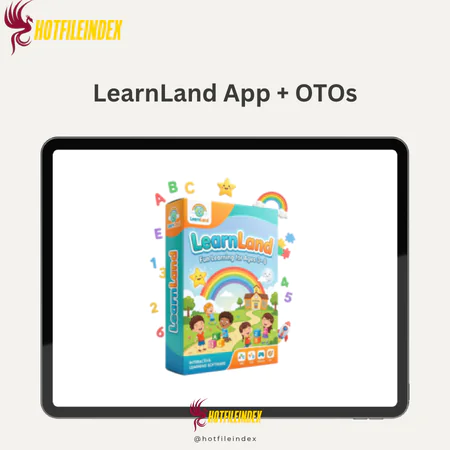
LearnLand App + OTOs
$17.00
LearnLand App is a suite of educational apps that teach kids various skills through age-specific, interactive learning experiences.
You will get Individual Account of
- FE + OTOs
LearnLand App is a collection of kid-friendly educational apps that combine arithmetic, computing, and world knowledge into interactive games for children aged 4 and up.
Consider it a structured ecosystem, a collection of targeted learning tools designed around a given topic domain, rather than a single app. Rather than cramming everything into one interface, LearnLand assigns each subject its own specialized section, making the experience more manageable for young learners.
Built by a team with over ten years of experience in software, tools, and technology, the platform is based on three guiding principles: safety, no ads, and actual educational value. It operates on iOS and Android, making it compatible with the devices that most families already own.
This tutorial has been written for:
- Parents searching for a screen-time solution that actually teaches something.
- Teachers and educators looking for supplemental tools that work inside or outside the classroom.
- Homeschool families and caregivers who want structured, curriculum-aligned activities at home.
Everything is available here, including the whole app catalog, main features, pricing, safety criteria, comparisons to alternatives, and answers to the most often asked questions by parents. Everything is current till 2026.
To determine whether LearnLand is the best fit for your child, consider how it operates, beginning with what's within.
LearnLand App Suite: All Available Apps & What They Teach

LearnLand is not a single app. It is a collection of more than 20 educational applications, each aimed at a specific skill set and age group. The idea behind this layout is simple: a youngster working on phonics does not have to traverse through code modules to locate what they need.
The LearnLand ecosystem is divided into the following primary app categories:
| Category | App Name | Age Range | Skills Covered | Platforms |
| Early Math | Number Land: Math for Kids | 4, 8 | Counting, addition, subtraction | iOS, Android |
| Coding & Logic | Code Land: Kids Coding Games | 6, 10+ | Sequencing, loops, problem-solving | iOS, Android |
| Science | How It Works? | 6, 10+ | Everyday science, mechanisms | iOS, Android |
| Geography | World Land | 7, 11 | Countries, maps, cultural awareness | iOS, Android |
| Creativity | Create Land | 5, 9 | Drawing, patterns, storytelling | iOS, Android |
| Literacy | Letter Land | 4, 7 | Letters, phonics, basic vocabulary | iOS, Android |
| STEM | Science Lab Land | 7, 10+ | Biology, physics experiments | iOS, Android |
| Social Skills | Daily Life Land | 4, 8 | Daily routines, social interaction | iOS, Android |
A 5-year-old can develop number awareness in just 10 minutes of Number Land each morning. A classroom of second-graders can work via Code Land on shared tablets, with each child moving at their own pace and independently. The modular structure enables such flexibility.
Beyond the different apps, LearnLand offers a single set of features focused on kid safety, incentive, and quantitative learning progress.
Core Features That Make LearnLand App Kid-Friendly & Effective
What distinguishes a learning application from a game? Intentional design. Every feature in the LearnLand ecosystem serves a purpose, whether it's to protect young users, keep them focused, or provide parents with insight into what their child is truly learning.
- Ad-free experience. There are no adverts anywhere within the LearnLand environment. Ads in children's apps disturb sessions, introduce improper content, and cause undesirable impulse behavior, which is a major concern for parents. LearnLand eliminates that variable totally.
- No in-app purchases. The apps don't use urgency mechanics, countdown timers, or hidden paywalls to encourage purchases. A youngster can play without ever facing a buy request, allowing the parent complete control over purchasing decisions.
- Age-appropriate content. Each app is organized around specific growth phases. The language, visual complexity, and cognitive load all increase with the target age group. A 4-year-old utilizing Letter Land will not encounter stuff appropriate for a 9-year-old.
- Adaptive Learning Paths. This is the most important aspect. When a child answers properly, the algorithm increases the task's complexity. When they struggle, the idea is revisited from a different perspective. In Number Land, a youngster who has mastered addition advances to place value, whilst a child who needs reinforcement receives targeted work.
- Session-Based Play. Sessions last between 10 and 15 minutes. This is consistent with child development research: short, frequent exposures help young learners retain more information than long, inactive sessions.
- Multi-modal feedback. Correct responses cause visible animations and aural prompts, whilst bad answers result in non-punishing correction. This replication of natural information processing aids in long-term memory.
- Navigation and Accessibility. Large touch targets, limited language, and icon-based menus allow a four-year-old to browse unaided. The interface does not assume literacy; instead, it guides users using visual hints.
- Rewards Without Overstimulation. Motivation mechanisms are well calibrated. Badges and prizes recognize effort without activating the dopamine-loop mechanism that makes toddlers reluctant to stopping.
Pricing Plans and OTOs detailed
Front End: Bundle Access Offer – $17
- Access bundled platforms including BrainBlast Academy, EscapeIQ, or LearnLand
- Age-segmented funnel tailored for different learning stages
- High-converting VSL focused on parents and emotional triggers
- Interactive learning environments designed for engagement
- All-in-one entry point for educational content ecosystem
OTO 1: Expanded Access
- Unlock extended curriculum with more in-depth learning content
- Access bonus rooms for additional activities and resources
- Includes advanced AI-powered learning features
- Open additional subjects and learning categories
- Enhance overall learning experience with more content and tools
How to Download & Get Started With LearnLand App: Step-by-Step
Getting started with LearnLand takes less than five minutes. The method is the same whether you're creating an account for a single child or a household with multiple profiles.
For iOS (iPhone / iPad):
- Open the App Store and search for “LearnLand.”
- Verify the publisher name and icon to avoid imitations.
- Tap Get to download; no payment is required for free-tier apps.
- Create a parent account using your email address.
- Set up the child's profile (name, age, and language).
For Android (Google Play):
- Open the Google Play Store and search for “LearnLand.”
- Confirm authenticity via user ratings and developer name.
- Tap Install; free apps download immediately.
- Complete the registration and build your child’s profile.
Before your first session, remember:
- Connect to Wi-Fi for the initial download of offline content.
- Enable system-level parental controls (Screen Time or Family Link).
- Set a session limit in the parent dashboard to match your household boundaries.
LearnLand vs. Other Kids' Learning Apps: Comparisons & Alternatives
Parents evaluating educational apps face a competitive market. The following comparison focuses on criteria that are relevant in practice: safety design, subject coverage, access model, and parent visibility.
| Feature / Criteria | LearnLand App Suite | Math-Focused App | Coding-Focused App | All-in-One Platform |
| Ad-free | Yes | Partially | Yes | Varies |
| Subject Coverage | Math, coding, STEM, literacy | Math only | Coding only | Multiple |
| Age Range | 4, 10+ | 6, 9 | 7, 12 | 3, 10 |
| Access Model | Pass + one-time options | Subscription | Subscription | Subscription |
| Offline Play | Yes (most apps) | Partial | No | Varies |
| Parent Dashboard | Yes | Basic | No | Yes |
| Adaptive Learning | Yes | Limited | No | Yes |
| In-app Purchases | None | No | Partial | Varies |
The main contrast is structural. Single-subject apps excel at one area, but a family with two children working on separate talents will require numerous subscriptions to cover the same ground that LearnLand does in one ecosystem.
All-in-one platforms aim to cover everything, but they frequently accomplish so by combining content into a single, confusing interface. Young children may find this overwhelming. LearnLand's model of separate, targeted apps under one account provides depth without cognitive overload.
For a parent handling arithmetic reinforcement and early coding exposure for two children aged five and eight, the LearnLand Pass is a more cost-effective and educationally consistent option than combining two or three different subscriptions.
Frequently Asked Questions About LearnLand App
Is LearnLand safe for my child?
Yes. The apps are designed with child safety as a primary requirement, not as an afterthought. There are no adverts, no links to other websites, and no social or chat features that expose youngsters to unfamiliar users.
Does LearnLand show ads or contain in-app purchases?
No advertisements exist throughout the environment. In-app purchases, where appropriate, are restricted to a parent account. A youngster using the app alone cannot initiate a transaction. The free-tier apps are completely played without cost.
What ages is LearnLand best suited for?
The ecosystem caters to children aged four to ten and up, with several apps addressing specific developmental stages. Letter Land and Number Land are appropriate for children ages four and seven. Code Land and Science Lab Land are appropriate for ages 6 and up. Most families find an app suitable for each stage within that range.
How much time should a child spend on LearnLand each day?
Sessions are planned to last between 10 and 15 minutes. For most kids ages 4 to 8, one to two lessons a day, for a total of 20 to 30 minutes, is a good schedule that they can stick with. This fits with advice for kids' screen time, which says to limit fun use while letting them watch good educational material.
What subjects does LearnLand cover?
The current ecosystem encompasses early mathematics, coding, reading, global geography, STEM concepts, spatial thinking, creativity, and social-emotional development. This is more comprehensive than most single-subject competitors.
Can multiple children share one subscription?
Yes. The LearnLand Pass allows for many child profiles under a single parent account. Each profile keeps track of its own progress, difficulty settings, and reward history, ensuring that siblings' learning paths do not overlap.
Does LearnLand work without an internet connection?
Yes, several programs in the suite allow for offline play after the initial download. While some services, such as progress syncing, need internet, you can download content in advance over Wi-Fi for travel or places with restricted access.
What devices are compatible with LearnLand?
The LearnLand apps can be used on both iOS (iPhone and iPad) and Android phones and computers. Make sure you have the base OS version for your tablet before you download from the App Store or Google Play.
How do I reset my child's progress?
From the parent dashboard, go to personal settings and clear out the progress. This is helpful for kids who want to watch something again from the beginning. Resetting one name on the same account doesn't change any of the others.
How do I cancel my subscription?
The platform where the subscription was bought (Apple App Store or Google Play) is where it needs to be handled. LearnLand does not handle refunds itself. You can still access the site until the end of the current billing term.
How is LearnLand different from free math games online?
Most free web games have ads and don't let you change how hard they are. LearnLand offers a structured way to learn with measured results, covering many subjects, and a safe space that free games rarely offer.
Can LearnLand replace a private tutor?
Not really. A tutor gives you specific emotional feedback that you can't get from an app. In addition to what a classroom teacher is already teaching, LearnLand gives students regular, structured practice to help them remember it.
Is LearnLand suitable for children with learning differences?
LearnLand's adaptive difficulty, multi-modal feedback, and short sessions make it a good fit for many children. However, parents of children with ADHD, dyslexia, or dyscalculia should start with the free tier to check the unique fit.
All Info just pre-build when listing. Until Product mark as "Instant Deliver", infomation will be updated again like OTOs you will be get,..etc
Related products

SAAS

SAAS


SAAS