
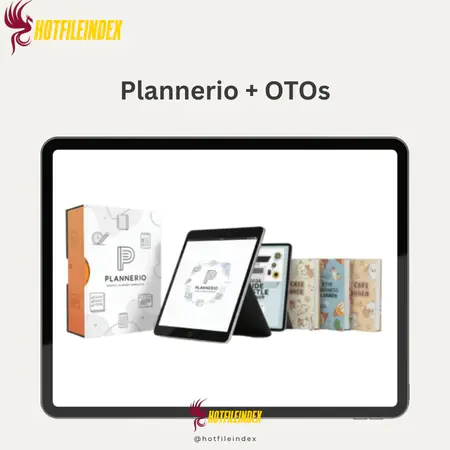
Plannerio + OTOs
$17.00
Plannerio is a Canva-based digital planner template bundle with over 1,100 fully editable pages that can be customized, branded, and used commercially without needing Canva Pro.
You will get Individual Account of
- FE
People need more digital tools for planning and organizing their lives as society becomes more digital. But starting from scratch with plans takes a lot of time, drawing skills, and a lot of trial and error, especially if you want to sell them. Plannerio gets rid of that problem by giving you a library of fully made in Canva plans that are ready to use. This is a good option for people who want a useful tool without a lot of work.
What is Plannerio?

Plannerio is a group of digital plan templates from Canva that were made after 2026. It doesn't just give one plan template; it has 20 advanced digital plan templates with more than 1,100 professionally designed pages that can be used in a range of fields and situations. You don't have to start from scratch or put together separate goods because all the parts are already prepared.
You can change the style, colors, text, and even the logo right in Canva. All plan templates are fully editable and customizable. As usual, you have the right to use them for commercial purposes. You can organize them for your own use or change and adapt them for clients, turning them into your own digital product, without any problems. Plannerio is also easy for beginners to use and doesn't cost a lot of money. You won't need Canva Pro or expensive design tools because it was made with only free Canva parts. You just need to open the examples, change the way they look, and then export them.
Key features of Plannerio
- 20 High-Quality Digital Planners with Over 1,100 Pages: Plannerio gives you access to a full library of more than 20 digital planners that were properly made and have more than 1,100 pages. Instead of trying to fit everything into one big notebook, give each person their own. This package has planners for business, productivity, mental health, living planning, parenting, finances, and education. If you want to sell planners in a wide range of areas, this is a great package for you.
- For Canva Templates (Fully Customizable with Free Version): All plan templates were made in Canva and work perfectly with the free version; you don't need Canva Pro or any other design program. You can change the text, colors, fonts, style, and pages. You can also add your own logo and pictures to make it your own. You don't have to be an expert at editing movies to make beautiful ones.
- Plannerio comes with business use rights, which means you can change the name of plan templates and sell them under your own name. When you sell them on Etsy, bundle them with lessons, give them away to customers, or build a digital product business, you keep all the money you make. Now Plannerio is more than just a calendar; it's also something that can be sold for money.
- Flexible Planner Collection: Other planners are focused on just one area, but Plannerio covers a lot of different areas. You don't have to buy extra templates to make plans for business owners, students, moms, health fans, and people who just want to live a healthy life. This gives you the freedom to try out new areas quickly and grow without having to do any more design work.
- Structures and layouts that have already been thought out: The daily view, weekly plan outline, monthly view, tools to keep track of everything you need to keep track of, spreadsheets, and reflection pages are all already planned out in each planner. Plannerio takes away the need to guess what to put in your planner and how to organize it, which saves you hours of planning and testing that you don't need to do.
- Make it your own for business or personal use: Plannerio can be changed to fit your business. You can make planners for different groups of people or change the colors, layout, and material to fit your brand. This works great if you want to spread the word about your brand, give customers goods and services, or sell plans as part of a digital line.
- There are also the following resources: There are fun extras that come with Plannerio that aren't included in the main plans. These include an Interactive Notion Formulas Workbook, a Digital Planner Sticker Pack, and Adult Journal Writing Suggestions. You can use these bonuses on their own or with your planner goods to make them more valuable and unique.
How to use Plannerio
Step 1: Choose
The Plannerio Team gives you instant access to more than 1,100 plan pages that have already been created by 20 premium plan brands. You can pick a plan or pages that work for your needs, like personally, for clients, or to sell again. There is no need to set anything up or spend time planning because everything is already organized and laid out for easy use.
Step 2: Customize
In Canva, open the designs and change them to fit your own style. You can change anything about the style to fit your needs, like adding your logo or making a page look different for a certain group of people. Even though you're using the free version of Canva, it's still easy and quick to make changes.
Step 3: Export & Use or Sell
You can use your plan for yourself or sell it as a digital product after you're done changing it. You can sell it to people, put it on Etsy, or your own website. The copyright for content is business, so any sales are yours alone.
Why you should use Plannerio?
- A huge amount of time and money can be saved: It might take weeks or cost a lot of money to hire someone to make you a planner from scratch. Plannerio solves that problem fully by giving you planners that were professionally made, can be customized, and are ready to use right away.
- Access right away, no waiting: We don't have to pay for printing, shipping, or waiting for arrival or setup for Plannerio because it is a digital product. As soon as you buy a planner, you can start making changes to it, exporting it, using it, or selling it.
- Use an offer to increase customer value (LTV): You only pay once, and after that you can use it for as long as you want. There are no monthly or annual fees. You can use templates, make new planners, and sell goods forever without having to pay ongoing costs that cut into your profits.
- There is a clear desire for digital planners on the market. Sellers on sites like Etsy are selling thousands or even tens of thousands of them.
- Plannerio lets you use a market that is already established and a library of products that are already out there right away, so you don't have to start from scratch.
- Flexibility to reach more than one goal: Plannerio gives you the freedom to balance your work life, start a side business selling digital goods, or make custom plans with your own brand for clients. It increases both personal efficiency and the chance to make money at the same time.
The Upgrade/OTO details
Plannerio Front End (FE) – $16.75
- 20 high-end smart planners in a range of popular categories
- More than 1,100 carefully designed planner pages are included.
- Canva themes that can be changed in any way (100% free Canva compatible)
- You can use these plans for business purposes and sell them as your own.
- Coverage of many niches, such as business, lifestyle, health, education, economics, and more
- ready-to-use plans that take the guesswork out of design
- Access for life with no contracts or fees that keep coming up
OTO 1: Plannerio EXT (Extended License + PLR) – $34.97
- Planner package with even more high-quality templates
- Full PLR rights that let you use and change it as much as you want
- Being able to sell plans again without giving credit
- Comes with a full Reseller Toolkit to help you sell faster.
- ready-made marketing materials to help with the resale
- Freedom to trade anything on any platform
OTO 2: Plannerio Merch (Print-on-Demand Designs) – $34.97
- Hundreds of ready-made design themes for Print-on-Demand
- There are templates that work best with mugs, shirts, signs, and notebooks.
- It works with personal shops, Etsy, Amazon, and Redbubble.
- You don't need to know how to create to edit and export in Canva.
- Allows quick entry into selling both real and digital goods
- Helps you make money from things other than digital tools
- Perfect for artists who want to make money in more than one way
Advantages
- A lot of value in one package: You get 20 premium planners with more than 1,100 pages, which is the same as getting several products separately or designing for weeks.
- Simple to use and built on Canva: Canva is used to make everything, and the free version can be used even if you don't know much about design.
- It comes with business rights and resale: You can rebrand and sell the planners under your own name, or you can even give them away to customers after they've bought them. You get to keep all the money you make, with no royalties or other limits.
- Plannerio can be used in more than one area, so it's flexible. With just one package, you can focus on any subject, such as parenting, business, education, living, health, or even health.
- Quick launch: Now that the plan templates are already made, you can sell them in hours instead of weeks after getting them.
Disadvantages
- To stand out, customization was needed: You'll be using templates that hundreds or even thousands of other people have bought, so you'll need to make changes to your plan if you want it to stand out and be competitive in the market.
- It helps to know the basics of Canva: If you've never used Canva before, it might take you a while to get used to it, even though it's easy to use.
Who is it for?
- Business owners: Plannerio helps people who want to start a business and make a digital product without having to work hard for months on end. You can get started quickly, test goods, and start making money with little setup time if you sell ready-made plan templates in different fields.
- You who make content: Do you want to make your name more valuable? Plannerio makes it simple to get paid for digital goods you make. You can make content marketing plan templates that will help your audience stay organized and give you more ways to make money besides ads and sponsorships.
- Part-time Workers: Plannerio is best for part-time workers who want to make extra money without doing much work. You can change, upload, and sell plan templates without making it your full-time job because the templates are already made.
- Coaches and advisers: Plannerio's structured planning tools can help coaches and advisers do better than their clients. You can also sell planning goods with your own name on them, like premium content, freebies for clients, or content that adds value to your coaching packages.
- Plannerio is great for students and teachers who want to make or sell study guides, organizational tools, and goods for planning your time. You don't have to worry about anything other than making a good design because all of the patterns are already made as templates.
- Bloggers and influencers: Bloggers and influencers can make money off of their followers by selling branding digital planning products that are specific to their field. You can sell these templates on their own or as part of a package with other products to add more material or make more money.
What You Get (Compared to Buying at HotFileIndex)
- Reviews based on real experience: We don't just look at the features; we also check out how it works, who it's best for, and what you can do with it. That way, you can make smart choices instead of guessing ones.
- Results that are clear: There will be clear language used to explain what you get, how to use or implement it, who gains the most, and what kind of results are normal. Don't use flowery words. Not making things up.
- up-to-date material that is organized: This way, you don't have to look for information in different places. Our site is neat, clean, and simple to understand.
- Ideal for first-time buyers: This digital product is great for beginners, and it also works as a business tools for Canva. We're sure you'll find our guide an easy way to start using Plannerio!
- Recommendation without risk: You only have to pay once for Plannerio; there is no need to subscribe. It also has a high selling value, which makes it a simple and risk-free way to start. The reason we say this right away is so you know exactly what you're getting.
FAQs
- Do I need Canva Pro to use Plannerio?
Not at all. You don't have to pay to edit, adjust, or export any Plannerio templates because they were all made with Canva's free tools and features. - Can I resell these planners as my own?
Yes. Plannerio gives you the right to sell and rebrand its plans as your own, and you can keep all the money you make. - Is this software beginner-friendly?
Of course. Plannerio is easy for newbies to use. You can use Canva if you know how to type and change the most basic parts of it. - Where can I sell the planner templates?
You can sell them on Etsy, your website, or social media, or you can offer them along with materials, classes, or coaching to get more people to buy them. - When can I start selling at the earliest?
Depending on how much branding they want to use, dozens of users can change and share a plan template in just hours. - Is this a one-time purchase?
Yes. Plannerio only costs one time, so you don't have to pay anything every month to keep using the designs.
Conclusion
Plannerio is the smart choice if you want to enter the digital product market with little risk, boost the value of your brand, or get new things to sell without having to deal with technology. Instead of starting from scratch or hiring a freelancer to make a plan, you'll have access to a library of multidisciplinary plans that are ready to use, can be changed, and can be sold again. Planio is the best choice for professionals who want speed, freedom, and long-term value all in one package.
All Info just pre-build when listing. Until Product mark as "Instant Deliver", infomation will be updated again like OTOs you will be get,..etc
Related products
Resources
Resources
Resources
Resources
Resources
Resources
Resources
Resources
Resources
Resources