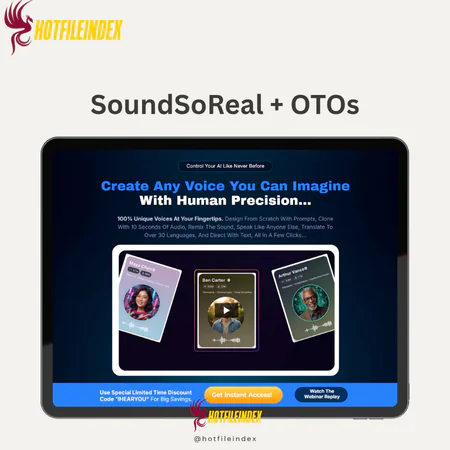
SoundSoReal + OTOs
Original price was: $67.00.$19.00Current price is: $19.00.
SoundSoReal is an advanced AI voice studio that lets you design, clone, and customize unique voices from just 10 seconds of audio, with options for multilingual translation and instant voice switching.
You will get Individual Account of
- FE + OTO1
High-quality voices have become essential in online marketing. Whether for video ads, sales pages, training modules, or podcasts, the right voice captures attention, maintains listener engagement, and drives action far more effectively than text alone. As demand for natural, professional-sounding voiceovers grows, traditional recording methods can be slow, expensive, and cumbersome.
Marketers want speed, creators need flexibility, and entrepreneurs seek results without the usual hassle. That’s where SoundSoReal comes in. This review will explore how it delivers authentic, fully customizable voices to meet today’s marketing demands.
What is SoundSoReal?

SoundSoReal is a cutting-edge AI Voice Designer and Studio that redefines voice creation. Unlike most platforms that recycle pre-made voices, it allows you to design, clone, and customize completely unique voices from scratch using a simple prompt.
With only 10 seconds of audio, you can clone any voice, including your own, and start using it immediately. From there, you can design unlimited character voices, translate them into multiple languages, or switch between voices with a single click.
Key Features

- Voice Cloning: Easily convert any voice you have rights to into a realistic digital clone. I’ve used this feature to replicate my own voice for online courses and client projects, saving hours of recording while maintaining a consistent sound across all content.
- Voice Design: Build entirely original voices from scratch with simple prompts. Whether you want a cinematic narrator or a warm, quirky character, the possibilities are endless. I used this to create unique voices for animated explainer videos, and the results sounded professional and polished.
- Voice Remix: Customize cloned voices by adjusting tone, adding softness, power, echo, or grit. I found this feature useful for making character voices more expressive in storytelling projects.
- Speak Like (Voice Changer): Upload any audio and instantly transform it into another voice. This was handy when I needed a fresh voice for a client’s ad campaign without re-recording.
- Voice & Video Translate (No Lipsync): Translate voices into multiple languages while maintaining natural tone, emotion, and delivery. I tested this on a tutorial video, and it made reaching international audiences simple and effective.
- Text-to-Speech: Type or paste your script and generate high-quality voiceovers in seconds. I often use this feature to quickly create narration for short videos, saving time and resources.
- Podcast / Multi-Speaker Creator: Assign different voices to multiple speakers for podcasts, interviews, or dialogue-heavy content, complete with acting instructions for natural flow. I tested this to produce a multi-character podcast episode, and it worked seamlessly.
- Voice Dubbing Across Languages: SoundSoReal supports dubbing in around 30 languages. Upload audio, select the target language, and the software translates while preserving the original tone, emotion, and style—ideal for creators looking to reach global audiences without hiring separate voice talent.
- Speak-Alike Capability: With proper permissions, upload audio and have SoundSoReal replicate that speaking style. Whether it’s a celebrity, newscaster, or industry expert, the software analyzes speech patterns and applies them to your content, delivering a consistent, professional sound.
Pricing plans

SoundSoReal Commercial (Front-End): $47 One-Time
This is the entry point into the platform and the most affordable way to get started:
- 20K characters per month
- 2 AI Voice Designers
- 5 Voice Clones
- Voice Translation included
- Access to 50 voices.
- Comes with Bonus 1 + Bonus 2
OTO 1: Voice Vault ($67)
- 300 Premium AI Voices: Covering every style, tone, and niche you can imagine.
- Voice Remix: Transform your cloned voices further — add softness, grit, echo, or power and make them truly unique.
- Speak Like (Voice Changer): Upload your own audio (or your client’s) and instantly transform it into another voice — without re-recording.
- 24/6 Support Service Included.
- 30-Day Money-Back Guarantee Policy Included.
OTO 2: CLONE FACTORY ($77)
- Unlimited Voice Clones.
- Record or upload only 10 seconds of audio, and SoundSoReal instantly builds a flawless clone. Perfect for branding, courses, YouTube, or selling voiceovers.
- Unlimited Voice Designers.
- Want to invent a voice from scratch? Just describe it — “powerful movie trailer voice,” “warm, caring teacher,” “animated character voice” — and watch SoundSoReal bring it to life.
- Low One-Time Investment.
- No limits. No ongoing fees. No paywalls. Just unlimited creativity, forever.
- 24/6 Support Service Included.
- 30-Day Money-Back Guarantee Policy Included.
OTO 3: AI Calls ($197/Year)
- Includes 1,000 minutes/month for AI-powered calls.
- Automate customer engagement, reminders, and lead follow-ups.
- Save time and resources while scaling communication.
- Perfect for entrepreneurs, agencies, and service providers.
If you’re hesitating over the official pricing or want to try SoundSoReal at a lower cost, Hotfileindex has you covered. Through Hotfileindex, you can get SoundSoReal for just $19—a fraction of the standard price.
Why Buy SoundSoReal from Hotfileindex?
Hotfileindex offers unbeatable value, reliable digital products, and a smooth shopping experience. Here’s why purchasing through us is a smart choice:
- Top-Quality Assurance: Every account is fully tested, 100% functional, and ready to use. We focus on delivering premium, dependable services.
- Best Value: At just $19, this is one of the most affordable options available, with no hidden fees.
- Easy Payment Options: Pay easily via MOMO or Online Banking for a fast, hassle-free checkout.
- 7-Day Refund Guarantee: Not satisfied? Contact us within 7 days for a full refund—no questions asked.
- 24/7 Support: Our dedicated team is available around the clock to answer questions and resolve issues.
How to Buy and Use SoundSoReal
- Step-by-Step Purchase Guide:
- Select Your Product: Browse the plans and add your preferred option to the cart.
- Confirm Your Order: Double-check your order details before proceeding.
- Choose a Payment Method: Select MOMO or Online Banking and enter the correct email to receive your account details.
- Complete Your Purchase: Finalize the transaction. You’ll get login credentials via email, then follow the instructions to start using SoundSoReal.
- Usage Instructions:
- Dashboard Overview: Access all features quickly from the main dashboard.
- Voice Design: Create a new voice by entering a detailed prompt with tone, pace, and style preferences. Generate a sample, then name and save it to your voice list.
- Voice Cloning: Upload or record a voice, accept the terms, and click “Create Voice” to clone it. The cloned voice will be saved in your list.
- Text-to-Speech: Add your script, select a voice, adjust settings, and generate speech. Use the v3 model for custom voices and include acting instructions for natural delivery.
- Voice Changer: Upload or record audio and select the voice you want to transform it into.
- Multi-Person Audio: Create dialogues or podcasts by assigning different voices to each part of your script. Adjust tone using acting instructions as needed.
- Dubbing: Upload your original audio, select a target language, edit the translated script, and generate a new voiceover.
This workflow allows you to design, clone, and transform voices efficiently.
Advantages
- Natural-Sounding Voices: Produces realistic voices suitable for marketing and other projects.
- Unique Branding: Create distinctive voices exclusive to your brand.
- Saves Production Time: Avoid hiring or re-recording voice actors repeatedly.
- Reduces Costs: One-time investment replaces recurring voiceover expenses.
- Multi-Language Capability: Reach global audiences easily.
- Beginner-Friendly: Intuitive platform for users new to AI tools.
- Scalable: Works for small projects and large-scale campaigns alike.
- Creative Flexibility: Supports characters, podcasts, and storytelling, beyond standard voiceovers.
- Commercial License Included: Full rights allow you to monetize your creations immediately.
- Trusted Team: Developed by Todd Gross & Oliver Goodwin, known for delivering reliable tools.
- Continuous Updates & Support: Regular updates and priority support ensure the platform stays current.
- Risk-Free Trial: 30-day money-back guarantee for peace of mind.
- User-Friendly Interface: Designed to produce results quickly without a steep learning curve.
Disadvantages
- Adjustment Period: While easy to use, achieving the perfect voice may require some experimentation.
Who Should Use SoundSoReal?
- Digital Marketers: Produce engaging ads, sales videos, and promotions with standout voices.
- Content Creators: Quickly create YouTube videos, tutorials, or courses without hiring voice actors.
- Entrepreneurs & Small Business Owners: Build a distinctive brand voice for recognition and trust.
- Agencies & Freelancers: Offer voiceover services as an extra revenue stream.
- Coaches & Educators: Transform lessons, training, and e-learning content into engaging voice-driven experiences.
- Podcasters: Produce episodes with multiple voices, interviews, or character-driven segments.
- Global Businesses: Translate content into multiple languages while keeping tone and delivery natural.
FAQs
- Is voice cloning legal?
You must have rights or permission to clone a voice. Only use voices you are authorized to, and always obtain written consent for client voices. - Can I use the audio for YouTube, ads, or podcasts?
Yes. Export the files and use them like any standard voiceover. For paid campaigns, check platform rules for synthetic voices. - How many languages can it translate into?
It supports multiple major languages while preserving tone and timing—ideal for short videos and ads. - Can it handle long audiobooks?
Yes, but for best results, split chapters into smaller sections and guide pacing with punctuation and brief notes. - What equipment do I need for cloning?
A quality USB microphone in a quiet room is sufficient. Clear, noise-free recordings produce the best results. - Can I sell the audio to clients?
Absolutely. Freelancers and agencies can offer voiceover services, multi-language versions, and podcast production with this tool. - Do I need a DAW?
You can export audio directly. For advanced mixing and mastering, a DAW like Audition, Reaper, or Logic is recommended.
Conclusion
If you create audio content regularly and want professional-quality results without long delays, SoundSoReal is an excellent choice. It allows you to clone voices you own, design new voices, tweak tone and style, translate into multiple languages, modify recorded voices instantly, generate expressive text-to-speech, and produce multi-speaker dialogues, all in one platform.
For the best price and a reliable purchase, get SoundSoReal through Hotfileindex and start producing high-quality audio content quickly and affordably.
All Info just pre-build when listing. Until Product mark as "Instant Deliver", infomation will be updated again like OTOs you will be get,..etc
Related products

SAAS
SAAS

SAAS

SAAS