

Granola AI Busines – 1 Year
$47.00
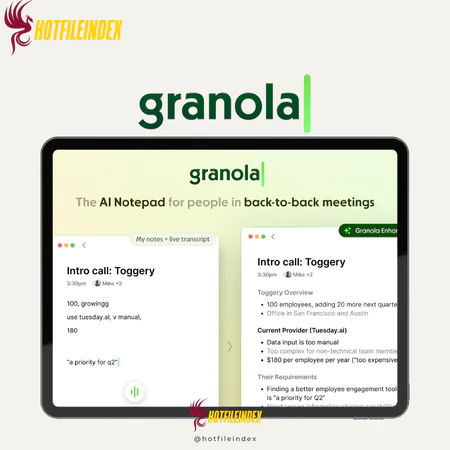
Granola is a discreet meeting note-taking tool that automatically captures conversations and delivers AI-powered summaries and insights without joining calls as a visible bot.
You will get Individual Account of
- FE (1 Year)
As artificial intelligence continues to reshape modern workflows, tools that support clearer thinking, better writing, and more organized ideas are becoming essential. Whether you’re a student, a professional, or a creative, choosing the right AI assistant can significantly improve productivity and output quality. This is where Granola AI comes into play.
Let’s explore what makes this tool stand out.
What is Granola AI?

Granola is a meeting note-taking and recording tool designed to operate discreetly in the background, without the need for intrusive bots to join your calls. Participants in the meeting don’t need to be aware that Granola is running at all.
Rather than offering audio replays, Granola emphasizes intelligent summaries and practical insights. It’s similar to having a personal note-taker present in every meeting. Afterward, you can interact with Granola’s AI chatbot to ask questions about a specific meeting or revisit information from past conversations across your organization.
Key features

- Real-Time Transcription: Granola captures both microphone and system audio to generate live transcripts using your Mac’s audio or your iPhone microphone. Visual cues indicate when transcription is active, and a live transcript window lets you follow the conversation in real time. Once connected to your calendar, transcription can start automatically at the beginning of meetings and be stopped manually. It works smoothly on Mac and Windows, supporting platforms such as Zoom, Google Meet, and Slack Huddles.
- AI-Generated Summaries: After each meeting, Granola uses AI to transform transcripts into clear, concise summaries highlighting key points, action items, and labeled speaker sections. You can ask follow-up questions to quickly find relevant parts of the discussion. Built-in prompts help extract insights, while the “Enhance Notes” feature allows you to refine and share summaries via email, Slack, or clipboard.
- Ask Granola (AI Assistant): During meetings, you can ask questions about the ongoing discussion using a simple keyboard shortcut. These responses are temporary and won’t be saved unless you copy them. The assistant only references your meeting history and does not perform external web searches.
- Privacy-First Recording: Granola does not store audio or video files. All media is processed in real time and deleted after transcription, with only text transcripts retained. You can also send a customizable consent message in the meeting chat to notify participants that transcription is active.
- Searchable, Shared Knowledge Hub: Meetings are automatically organized into customizable folders, making it easy to store, search, and reuse information across different clients, projects, or teams.
- Meeting AI Chat & Source Validation: Within Granola’s dashboard, you can collaborate on notes and ask AI follow-up questions based on the transcript. Each summary point can be traced back to its original moment in the conversation, improving transparency and confidence in the information.
- Automations & Integrations: Granola integrates with tools like HubSpot, Slack, Notion, and Zapier, allowing you to automate workflows and streamline how meeting insights are shared and applied.
Pricing plans

| Plan | Price | Billing | Recommended For |
| Basic | $0 / user / month | Free | Individuals testing Granola, solo users, students, or professionals with light meeting needs |
| Business | $14 / user / month | Monthly | Freelancers, startups, consultants, and small teams that rely heavily on meetings |
| Enterprise | $35 / user / month | Monthly | Large organizations requiring advanced controls, compliance, and company-wide deployment |
Advantages
- Improves meeting focus: Granola helps project managers, consultants, and team leaders stay fully present in discussions. Instead of dividing attention between note-taking and contributing, users can listen attentively, think more strategically, and participate more effectively, reducing mental strain during meetings.
- Acts as a reliable safety net: The tool captures key details, exact phrasing, and action items that might otherwise be missed or forgotten. This leads to greater accuracy, stronger accountability, and clearer follow-ups after meetings.
- Delivers fast, clear summaries: Rather than reviewing lengthy notes or replaying meetings, Granola’s AI-generated summaries highlight the most important points right away, saving time and post-meeting effort.
- Simple and intuitive experience: Setup is quick and results are easy to access, with little configuration required. The clean, user-friendly interface makes Granola approachable even for users with limited technical skills.
- Cost-effective pricing: With affordable plans, including a free option, Granola is accessible to individuals and small teams without requiring a significant upfront investment.
Disadvantages
- Not 100% accurate: AI transcription is not perfect. It may struggle with technical jargon, industry-specific terms, strong accents, overlapping speakers, or poor audio quality. While summaries are useful, they can occasionally miss subtle nuances or important context.
- Primarily English-focused: For international or multilingual teams, a notable limitation is that most AI note-taking tools, including Granola, perform best in English, with more limited support for other languages.
- Privacy and security considerations: Recording and analyzing meetings involves sensitive information. Teams must ensure all participants give consent and feel confident in the provider’s data handling, storage, and privacy practices.
- Missing non-verbal cues: AI captures spoken words but cannot interpret body language, facial expressions, tone, or visual context. These non-verbal elements are often crucial for understanding emotions, intent, or subtleties like sarcasm or disagreement.
Who should use Granola AI?
- Managers and team leaders: Stay actively engaged in discussions without the distraction of detailed note-taking.
- Consultants and client-facing professionals: Keep accurate records, action items, and follow-ups from frequent meetings.
- Remote and hybrid teams: Create and share consistent, reliable meeting summaries across distributed teams.
- Freelancers and solo professionals: Easily document calls and retain important details without extra tools or manual effort.
- Knowledge workers and executives: Access concise, searchable meeting summaries instead of reviewing long transcripts.
FAQs about Granola AI
- Is Granola AI safe to use?
Yes. Granola AI is generally considered safe, as it records audio locally on your device without using meeting bots. It emphasizes user control over data and applies security measures to protect notes and transcripts. - What is Granola AI used for?
Granola AI is built to capture, organize, and improve meeting notes by combining human-written notes with AI-powered transcription to produce clear, structured summaries. - Can Granola record phone calls?
Granola AI does not directly record standard phone calls. However, it can transcribe calls made on a Mac through Apple’s Continuity feature or WhatsApp calls on Mac. - What does Granola AI do?
Granola AI is an AI note-taking application that automatically transcribes meetings, generates summaries, and enhances your live notes with additional context from the transcript. - Is Granola AI free to use?
Granola AI offers a free plan, but the ability to view and search meeting notes is limited to a specific time window. - Is AI note-taking legal?
AI note-taking is legal as long as all participants are informed and give consent to being recorded and transcribed. It must also comply with applicable privacy, data protection, and recording laws in the relevant region.
Conclusion
Using Granola AI made my meetings feel noticeably more efficient and focused. What stood out most was the human–AI note-taking approach: I could take my own notes while the AI automatically added structure, context, and clear action items—without an intrusive meeting bot joining the call.
If you want to try Granola AI at a more affordable price, it’s worth checking out Hotfileindex, where you can often find better deals compared to the official pricing.
| Time | 1 Year |
|---|
All Info just pre-build when listing. Until Product mark as "Instant Deliver", infomation will be updated again like OTOs you will be get,..etc
Related products

Account

Account

Account

Account
Account

Account

Shared
Account

Account