

iLoveIMG
Original price was: $84.00.$11.00Current price is: $11.00.
iLoveIMG is a web-based tool that lets users efficiently compress, convert, and edit images with consistent quality and batch processing support
You will get Shared Account of
- FE
Images often need quick edits before they are ready to be used. You may need to compress large files, resize images for websites, convert them into different formats, or apply simple adjustments. Performing these tasks with traditional editing software can sometimes be slow and unnecessary, especially when you only require fast and basic modifications.
This is where iLoveIMG becomes a helpful solution. It offers a set of online tools that allow users to compress, resize, convert, and edit images quickly and conveniently.
What is iLoveIMG?

iLoveIMG is a flexible web-based platform designed for professionals, hobbyists, and anyone who needs to optimize images efficiently. The tool enables users to compress, convert, and edit images while maintaining stable performance and quality. Thanks to features such as batch processing and reliable output quality, iLoveIMG has become a popular choice among many online image editing tools.
Key features

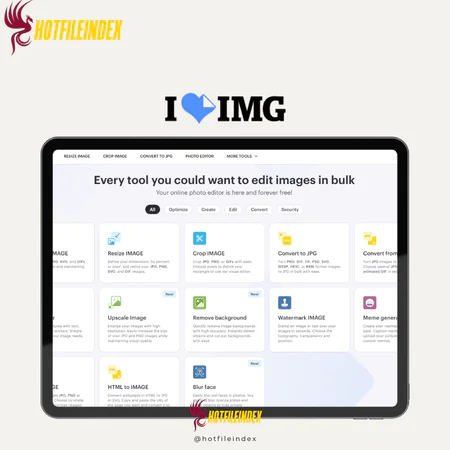
- Image Compression: Reduce the file size of JPG, PNG, SVG, and GIF images while preserving good visual quality, making them easier to upload, store, and share.
- Image Resizing: Modify image dimensions by specifying pixels or percentages, allowing users to quickly adapt images for websites, social media, or documents.
- Image Cropping: Select and trim specific parts of an image to highlight important content or remove unnecessary areas.
- Image Format Conversion: Convert images between common formats such as JPG, PNG, GIF, WEBP, or TIFF to ensure compatibility with different platforms and applications.
- Photo Editing Tools: Add text, shapes, frames, or simple effects directly within the platform for quick visual adjustments.
- Image Upscaling: Increase the resolution of images while maintaining quality, helping improve clarity when enlarging pictures.
- Background Removal: Automatically detect and remove image backgrounds, making it easier to isolate subjects or create transparent graphics.
- Watermarking: Apply text or image watermarks to protect ownership, support branding, or prevent unauthorized usage.
- Batch Processing: Handle multiple images simultaneously for tasks such as resizing, compressing, or converting, which saves time when working with large collections of images.
- Cloud Integration: Upload images from cloud storage services and save processed files back to the cloud for convenient file management.
- Secure File Processing: Uploaded images are processed securely and automatically deleted after a certain period to help protect user privacy.
Pricing plans

| Plan | Price | Users |
| Basic | Free | 1 |
| Premium | $7/month | 1–25 |
| Business | Custom pricing | 25+ |
Advantages
- Generous Free Bulk Processing: iLoveIMG allows users to process multiple images at once without requiring a paid subscription. This makes it convenient for compressing, resizing, or converting large batches of images while saving both time and effort.
- Built-in Image Editing Tools: The platform provides several simple editing tools that allow users to make quick adjustments directly online. You can crop images, insert text or shapes, and apply basic visual edits without needing separate photo editing software.
- User-Friendly Interface: iLoveIMG features a clean and intuitive design that makes it easy to navigate and manage tasks. Even users with minimal technical knowledge can quickly understand how to upload, edit, and download their images.
- Wide Format Support: The tool supports a variety of popular image formats including JPG, PNG, GIF, WEBP, and more. This flexibility allows users to work with images across different platforms and projects without compatibility issues.
Disadvantages
- Account Registration Required: To access certain features and manage files more effectively, users are required to create an account and sign in.
- Limited Processing in the Free Plan: Although many tools are available for free, the free version includes some limitations such as restrictions on file size, the number of daily tasks, or the number of images processed at one time.
- Advertisements in the Free Version: Users who rely on the free plan may encounter advertisements while using the platform.
Who should use iLoveIMG?
- Students and Educators: Helpful for resizing, compressing, or converting images for assignments, presentations, and educational materials.
- Content Creators and Marketers: Useful for preparing optimized images for blogs, websites, and social media posts.
- Designers and Photographers: Suitable for quick adjustments such as resizing, format conversion, or simple edits before moving to advanced design work.
- Website Owners: Helps compress and optimize images to improve website loading speed and overall performance.
- Casual Users: Ideal for anyone who needs a quick and simple tool to resize, convert, or compress images.
FAQs about iLoveIMG
- Can iLoveIMG convert images to different formats?
Yes. iLoveIMG allows users to convert images between common formats such as JPG, PNG, and GIF, making it easier to prepare images for different platforms or technical requirements. - Does iLoveIMG support bulk image processing?
Yes. One of the main strengths of iLoveIMG is its batch processing capability. Users can upload multiple images at once and apply tasks such as compression, resizing, or format conversion to all of them simultaneously. - Is iLoveIMG free to use?
iLoveIMG offers a free version that includes core features like image compression, resizing, and format conversion. However, the free plan may have certain limitations, such as file size restrictions or the presence of advertisements. - Is iLoveIMG safe for uploading images?
Yes. iLoveIMG processes files securely and automatically deletes uploaded images after a certain time. This helps ensure user privacy and prevents files from remaining stored on the system.
Conclusion
Overall, iLoveIMG is a convenient and efficient tool for handling everyday image optimization tasks. With features for compressing, resizing, converting, and editing images, it allows users to manage visual content quickly without relying on complex software.
For users who need a fast and accessible solution for basic image editing and optimization, iLoveIMG offers a practical option that can significantly simplify the workflow.
All Info just pre-build when listing. Until Product mark as "Instant Deliver", infomation will be updated again like OTOs you will be get,..etc
Related products
Shared
Shared

Shared

Shared

Shared

Shared
Shared
Shared
Content & Articles Tools
Shared