


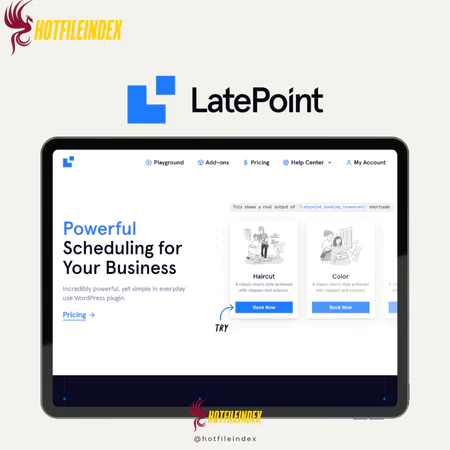
LatePoint (Agency LTD)
$68.00
LatePoint is an easy-to-use WordPress booking plugin that simplifies appointment management with a professional interface, payment integrations, and automated reminders—no coding required.
You will get Shared Account of
- Agency LTD
If you’re a solo business owner, freelancer, or small entrepreneur managing every aspect of your work alone, keeping track of appointments and bookings can become overwhelming. That’s where LatePoint steps in. This versatile WordPress plugin lets you create a complete online booking system with ease, without requiring any technical skills or complex setups. LatePoint helps you automate scheduling, organize your calendar, send reminders to clients, and simplify your entire appointment workflow.
What is LatePoint?

LatePoint is a robust WordPress booking plugin that delivers a fast, intuitive experience with a polished, professional interface. It streamlines appointment management while keeping clients satisfied. Using LatePoint, you can build a fully operational booking system without touching a line of code. The plugin also supports advanced integrations with payment processors such as Stripe and communication tools like Twilio, enabling automated reminders and a smoother workflow.
Key Features

- Intuitive Setup Wizard: Getting started with LatePoint is simple and user-friendly. The three-step process—adding agents, defining services, and setting working hours—makes it easy to implement. In my experience, the setup was completed in under 15 minutes without any technical knowledge or additional plugins.
- Customizable Scheduling: Each service, agent, or location can have unique availability. You can also designate specific holidays, days off, or custom schedules. I found this especially helpful when reserving weekends for personal time, as the calendar updated automatically.
- User-Friendly Booking Interface: Customers can easily choose services, select an agent, and pick a convenient time slot. Payments can be made immediately or deferred. During testing, I noticed the interface was extremely smooth and straightforward, reducing the usual back-and-forth emails.
- Automated Notifications: Email and SMS alerts are automatically sent to both clients and staff, helping minimize no-shows. Personally, this feature saved a lot of time I would normally spend confirming appointments manually, and clients were more punctual.
- Mobile-Optimized Design: Booking forms and calendars are fully responsive on mobile devices. In tests on both iOS and Android, the experience was seamless, which is crucial since many clients book via their phones.
- Two-Way Messaging: LatePoint enables direct communication between staff and clients. I found this feature invaluable for clarifying appointment details or managing last-minute changes without using external apps.
- Comprehensive Dashboard: The admin interface offers a complete overview of appointments, payments, and client interactions. The analytics tools helped me identify peak booking times and popular services, allowing me to refine my offerings.
- Flexible Payment Integrations: Supports widely used gateways like Stripe and PayPal for secure and convenient transactions. I integrated Stripe myself, and the process was flawless—clients could pay upfront without any manual tracking on my part.
- Shortcode Support: Booking forms, buttons, or agent lists can be embedded anywhere on your WordPress site using shortcodes. I placed the form on both my homepage and a dedicated services page, which increased bookings since clients could schedule without navigating away.
- Customizable Branding: The booking interface can be tailored to match your brand’s colors and style. I adjusted the widget to fit my website’s theme, achieving a professional look without coding.
- Advanced Integrations: LatePoint works with tools like Twilio for SMS notifications and other plugins to enhance functionality. After setting up Twilio, I noticed a 30% drop in missed appointments as clients received instant alerts.
Pricing Plans

LatePoint provides three pricing tiers tailored to different business needs:
- Starter Plan – $199 (one-time)
Best suited for solo entrepreneurs, freelancers, or small businesses requiring a single booking system. This plan offers a cost-effective way to add professional booking capabilities with no ongoing fees. - Scale Plan – $399 (one-time)
Supports up to 5 websites, ideal for growing businesses or small agencies managing multiple clients. This plan allows you to deploy LatePoint across several projects, providing flexibility for multi-site usage. - Agency Plan – $599 (one-time)
Covers up to 100 websites, making it perfect for larger agencies or developers handling multiple clients. It offers maximum scalability while keeping costs predictable.
All plans also allow payments to be split into 11 monthly installments, easing upfront costs. For an even better offer, RankMarket provides the LatePoint LTD Agency plan at a discounted rate of just $68.
Advantages
- Very user-friendly, even for those who lack technical skills.
- Highly flexible, allowing you to adapt it to meet your specific business needs.
- Works seamlessly with payment systems and client management tools.
- Helps keep your schedule organized and sends automated reminders to clients.
- Provides insights into customer behavior and business performance for better decision-making.
- Regular updates add new features and enhance functionality.
- Active Discord community offers advice, tips, and peer support.
- Responsive and knowledgeable customer support team.
Disadvantages
- No completely free version; full functionality requires a paid plan.
- Learning all the advanced options may take some time.
- Premium design features are only available on the Pro plan.
- Occasionally requires manual page refreshes, which can be inconvenient.
- Some advanced functions may be unnecessary for smaller or simpler businesses.
- Certain third-party integrations may require technical knowledge.
Who Should Use LatePoint?
LatePoint is a versatile tool suitable for a wide range of industries:
- Beauty and Personal Care: Ideal for salons and spas to manage treatments, staff schedules, and bookings.
- Health and Wellness: Perfect for gyms, yoga studios, and personal trainers to organize classes and individual sessions.
- Medical Practices: Doctors, dentists, and therapists can efficiently schedule patient appointments.
- Consulting and Coaching: Business coaches, consultants, and therapists can plan client meetings effortlessly.
- Education and Training: Tutors and training centers can manage classes, workshops, and sessions.
- Hospitality and Events: Event organizers and venues can handle reservations and event bookings effectively.
- Professional Services: Lawyers, accountants, and other professionals can schedule consultations efficiently.
FAQs About LatePoint
- How do I install LatePoint?
You can install it by downloading the plugin from the WordPress directory and uploading the ZIP file to your site, or directly install it from the WordPress dashboard. Once activated, you can immediately create booking forms and start managing appointments. - What features does LatePoint offer?
It includes customizable booking forms, payment gateway integrations (Stripe, PayPal), automated email and SMS notifications, recurring appointments, Zoom and Google Meet support for online sessions, and analytics to monitor business performance and client preferences. - Is there a free version?
Yes, a free version exists with basic booking functionality. Advanced features, premium designs, and additional integrations require a paid plan. - Can I customize the booking calendar?
Yes, the calendar can be styled with CSS to match your website’s branding. For more advanced customization, using a child theme is recommended to avoid issues during updates. - How does LatePoint compare to other booking plugins?
LatePoint stands out with its balance of simplicity, flexibility, and cost-effectiveness. Its intuitive interface, wide range of customization options, and lifetime license make it more affordable than subscription-based alternatives. - What support options are available?
Support includes detailed documentation, an active Discord community for tips, and direct customer service for plugin-related issues. It generally does not cover custom coding or conflicts with other plugins or themes. - Is LatePoint secure?
Yes, it is regularly updated to maintain security and compatibility. Keeping both the plugin and your WordPress installation updated ensures maximum protection.
Conclusion
LatePoint is a comprehensive, feature-rich WordPress booking plugin that makes setting up a professional appointment system simple and efficient. Among the many options available, it stands out for its ease of use, flexibility, and robust functionality.
Its powerful features allow you to create an attractive and effective booking site with minimal effort. The lifetime license eliminates recurring subscription fees, making it a highly cost-effective solution.
For the best value and a smooth purchasing experience, consider acquiring LatePoint through Hotfileindex, which ensures a secure and hassle-free process.
| Time | LTD |
|---|
All Info just pre-build when listing. Until Product mark as "Instant Deliver", infomation will be updated again like OTOs you will be get,..etc
Related products

WordPress
WordPress

WordPress

WordPress
WordPress

WordPress
WordPress

WordPress

WordPress